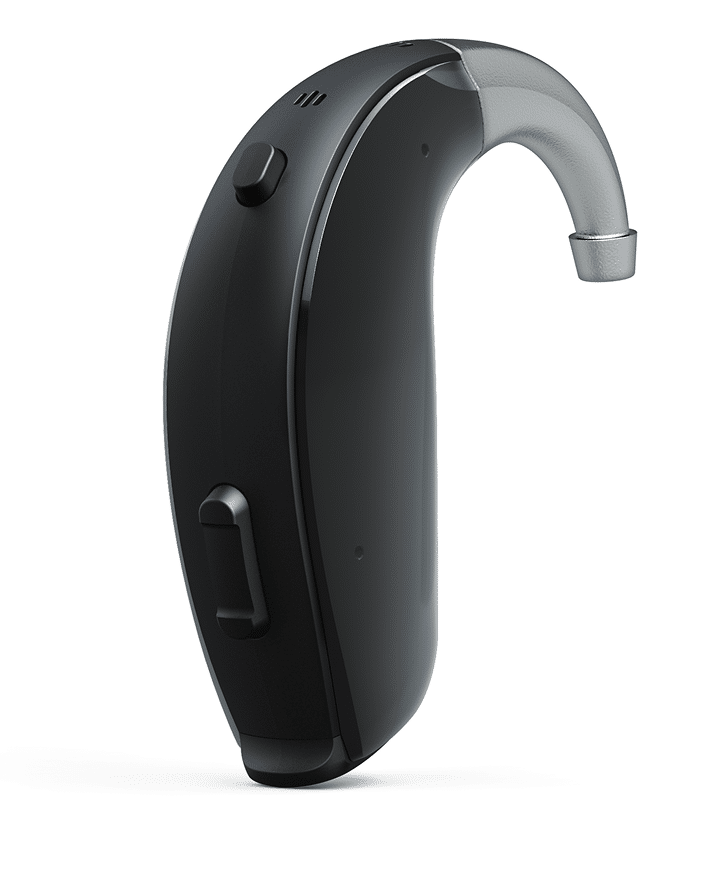

Key features and benefits

Powerful Sound Performance
Designed for severe to profound hearing loss, ENZO Q delivers clear, comfortable sound with strong amplification while keeping listening natural and balanced.

Direct Streaming & Connectivity
Stream calls, music and TV audio directly from compatible smart devices to your hearing aids for clear, hands-free listening.
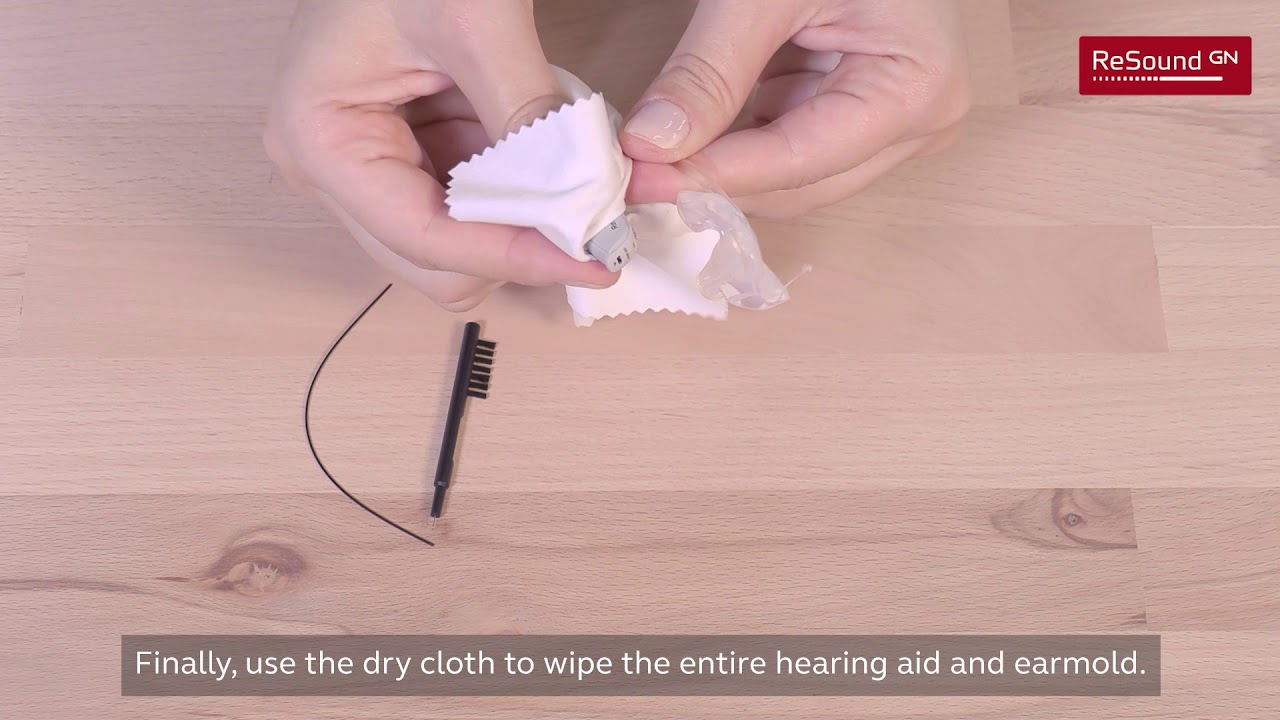
ReSound Enzo Q – Cleaning your BTE hearing aids
ReSound Enzo Q – Cleaning your BTE hearing aids
If you notice feedback or whistling, first check that the earmould is inserted correctly and fully in your ear. Then look for cracks or gaps in the tubing or earmould and, if you find any, contact your hearing care professional. Turning the volume down slightly may help in the short term, but if feedback continues, your hearing care professional may need to adjust the fit of your earmould or fine-tune your hearing aids.
When you are new to hearing aids, it can be helpful to start gradually and listen to your body. Many people begin by wearing them for a few hours in quieter situations and then slowly increase the time as they feel more comfortable. Over time, most users find that wearing their hearing aids throughout the day becomes a natural part of their routine and helps them feel more connected and less tired from listening.
Yes, it is very common for everyday sounds to feel louder or sharper when you first start using hearing aids, because your brain is re-learning how to process sounds it has not heard clearly for some time. Things like footsteps, traffic, or paper rustling can stand out more at the beginning, and your own voice may sound different too. This usually improves as your brain adapts, but if you feel consistently uncomfortable, your hearing care professional can adjust the settings to make the transition smoother.
Hearing aids are not designed to be worn while showering, swimming, or taking a bath, so it is best to remove them before any activity where they might be submerged in water. Even if your hearing aids are water-resistant, long exposure to water can still cause damage over time. Keeping them dry in these situations helps protect their delicate components and keeps them working reliably.
You can generally wear your hearing aids during light to moderate exercise, and many people enjoy being able to hear clearly while walking, gardening, or doing other activities. If you sweat a lot or expect to get very wet, try to wipe your hearing aids gently afterwards and consider using covers or accessories made to protect them from moisture. If you are doing very vigorous exercise, you might talk to your hearing care professional about the best way to keep your devices comfortable and secure.
In most cases, it is recommended to remove your hearing aids before you go to sleep. Taking them out at night gives your ears a chance to rest and reduces the risk of the devices falling out or being damaged while you move in your sleep. Storing them in the charger or case while you rest also ensures that they are safe, dry, and ready for you the next morning.
If your hearing aids whistle or squeal, this is called feedback, and it usually means that sound is escaping from your ear and being picked up again by the microphones. You can often reduce this by gently removing and re-inserting the hearing aids so they fit more securely, and by checking that nothing like a hat or scarf is pressing against them. If the whistling continues, your hearing care professional can look at the fit, the earpieces, and the settings to help improve the situation.
Many people with hearing loss say that noisy places are the hardest. Restaurants, family gatherings or busy streets can feel overwhelming because your brain has to work much harder to separate speech from background sounds. Hearing technology is designed to support this process and reduce listening strain.
Directional technology uses the hearing aid’s microphones to focus more on certain sounds, such as a person speaking in front of you, while reducing background noise. It is like gently turning down distractions so conversations are easier to follow without completely shutting out your surroundings. Different hearing aids offer different levels of directional technology.
In real life, important sounds do not always come from directly in front of you. Someone might call your name from behind, or a waiter may speak from the side. Good hearing technology supports speech clarity while still keeping you aware of your environment, helping you feel confident and safe.
Learning to insert your hearing aids can take a little practice, but it quickly becomes a simple part of your daily routine. It can help to stand in front of a mirror, hold the hearing aid by the main body, and gently guide the earpiece into your ear canal, using any small handle or “sport lock” to position it comfortably. You should feel a secure but gentle fit without pain or pressure, and if you are ever unsure, your hearing care professional will be happy to show you again until it feels easy.
It is completely normal for the adjustment period to take a little time, and everyone’s experience is different. Many people notice that it takes a few weeks to a few months before wearing hearing aids feels completely natural, because your brain is adapting to hearing more sounds again. Being patient with yourself, wearing the hearing aids regularly, and staying in touch with your hearing care professional for follow-ups can all help make this process smoother and more comfortable.
In the first few days, you may notice that everyday sounds seem different or more noticeable, and your own voice might sound a bit unfamiliar. You might also feel more tired than usual as your brain works harder to process all this extra information, and this is perfectly normal. If something feels painful or very uncomfortable, it is important to contact your hearing care professional, but many initial impressions do settle down as you adjust and as the settings are fine-tuned to your needs.
Follow-up visits are a normal and helpful part of your hearing journey. It is common to have a few appointments in the first weeks and months so that your hearing care professional can check how you are doing, fine-tune the sound, and answer any questions that come up in real life. After that, regular check-ups are still valuable to make sure your hearing aids and your hearing are both in good shape, and you can always book an extra visit if you feel something has changed.
For your follow-up visits, it is helpful to bring your hearing aids, your charger or batteries, and any accessories you use, such as a TV streamer or remote. You might also want to note down a few situations where you heard very well and others where you struggled, so your hearing care professional can better understand your daily experience. The more examples you can share, the easier it is to adjust your hearing aids to match your lifestyle and preferences.
When you are fitted with hearing aids, they are programmed based on your hearing test results. This includes how much sound is amplified at different pitches, as well as how features like noise reduction are set. These initial settings are designed to give you a strong starting point that matches your hearing needs and listening preferences.
No. While hearing aids have default settings, they are highly personalised. Factors such as your specific hearing levels, listening lifestyle and whether you are new to hearing aids or have worn them before all influence how features are set. Your hearing care professional will adjust them to suit you individually.
Advanced features are built-in technologies designed to help your hearing aids perform better in real-world situations. They can reduce background noise, soften sudden loud sounds like clinking dishes, and make listening in quiet environments more comfortable. These features work automatically in the background to support a more natural and balanced listening experience.
Hearing loss is far more common than many people realise. It affects hundreds of millions of people worldwide, including both adults and children. It can happen at any stage of life and does not discriminate, which is why awareness and early attention are so important.
Hearing loss can be caused by many different factors, including ageing, genetics, illness, certain medications and exposure to loud noise. Sometimes it develops gradually over time, making it difficult to notice at first. In other cases, it can happen more suddenly due to illness or injury.
Changes in hearing are common as we get older, but that does not mean they should be ignored. Just like vision or mobility, hearing health deserves attention. Addressing hearing changes early can help maintain confidence, communication and overall wellbeing.
Untreated hearing loss can affect much more than just your ability to hear sounds. It can impact communication, relationships, emotional wellbeing and overall quality of life. Over time, listening can become exhausting and frustrating, leading some people to withdraw from conversations or social situations without even realising it.
Yes, it can. Struggling to follow conversations may lead to stress, frustration and feelings of isolation. When communication becomes difficult, people may feel disconnected from family, friends and colleagues, which can affect mood, confidence and overall wellbeing.
Hearing loss affects more than just communication. Research has shown links between untreated hearing loss and increased risk of falls, cognitive decline and poorer overall health. Addressing hearing loss early supports not only clearer hearing, but also broader wellbeing and quality of life.
Many people find that hearing aids make a meaningful difference in their daily lives. They often report feeling less mentally tired, more confident in conversations and more socially engaged. Modern hearing technology is designed to support clearer speech and more natural listening across a wide range of environments.
Yes. Most hearing aid users report noticeable improvements in communication, relationships and daily activities. Many feel less exhausted at the end of the day and experience improved emotional wellbeing when their hearing is properly supported.
The journey usually begins with a simple hearing check. Screening is quick and straightforward, and it can help identify whether further assessment or support is needed. Taking early action can make a real difference in maintaining communication, confidence and independence.
Hearing aids are recommended because they can make speech and everyday sounds clearer and more accessible, helping you stay connected to the people and activities that are important to you. While they do not cure hearing loss, they provide support where your ears need it, so that listening takes less effort and conversations feel more natural. Many people find that using hearing aids opens up social situations and reduces the strain and isolation that hearing difficulties can sometimes cause.
Hearing aids cannot take your hearing back to exactly how it was before you experienced hearing loss, but they are designed to bring important sounds, especially speech, back into focus in a comfortable way. You may still notice that some situations are challenging, particularly in very noisy places, but most people feel a clear improvement in their ability to follow conversation and enjoy daily activities. Over time, as your brain adapts and your devices are fine-tuned, the overall experience often becomes more and more natural.
Yes, even with modern hearing aids, very noisy environments like busy restaurants or crowded events can still be challenging, and this is normal. Your hearing aids can help you hear better than you would without them, but they cannot remove all background noise or make every situation perfect. You can support them by choosing seating that puts you closer to the person you want to hear, facing people when they speak, and reducing unnecessary noise when possible. You may wish to investigate a ‘remote microphone’ that can be linked wirelessly to many hearing aids.
Using hearing aids will not make your hearing worse; in fact, they are designed to support your hearing and help your brain stay active in processing sounds and speech. Your hearing may change over time due to age or other health factors, but this happens whether or not you wear hearing aids. By using your devices and seeing your hearing care professional regularly, you can make sure you are always getting the best possible support for your current hearing level.
It is a good idea to have your hearing checked on a regular basis, for example once every 2 years, or as recommended by your hearing care professional, so that any changes can be picked up and managed early. If you notice sudden changes in your hearing, ringing in your ears, pain, dizziness, or any other worrying symptoms, it is important to contact a healthcare provider promptly. Keeping track of your hearing over time helps ensure that your hearing aids and your overall care plan stay well suited to your needs.
It is completely understandable to have mixed feelings about wearing hearing aids, especially at the beginning, and many people share this concern. Today’s devices are often discreet and look similar to everyday earbuds that many people of all ages wear, and often others do not notice them at all. More importantly, many users find that the benefits of hearing better—feeling included in conversations, enjoying music, and staying independent—quickly become more important than any worries about how the devices look.
If you suddenly hear no sound, try not to worry—many issues are easy to check. First, make sure the hearing aids are turned on and that the battery is charged or correctly inserted. Then look at the earpiece and wax filter or microphone filter to see if they are blocked, and gently clean or replace them if needed. Also check that the hearing aids are properly placed in your ears. If, after these steps, you still cannot hear anything, it is time to contact your hearing care professional for help.
When sound becomes weak, distorted, or comes and goes, it is often related to earwax, moisture, or a low battery. Try cleaning the earpiece and checking the wax filter or microphone filters, and make sure the battery is fully charged or fresh. If you notice that the problem only occurs when you are streaming, look at your connection and how far you are from the device. If the sound still doesn’t feel right after these checks, your hearing care professional can examine the devices and settings in more detail.
If your hearing aids turn off on their own, it may be because the battery is nearly empty, or the devices have been exposed to heat or moisture, or there may be a technical fault. Start by fully charging or changing the batteries and letting the devices dry in a safe place. If the hearing aids continue to switch off by themselves, it is important to contact your hearing care professional so they can investigate the cause and find a solution.
When only one hearing aid seems to work, it can help to do a few simple tests. You can swap the batteries between the two devices or switch their positions in the charger to see if the problem follows one unit. Take a close look at the earpiece and wax filter on the side that is not working and clean or replace them if necessary, and make sure both hearing aids are turned on and not in flight mode. If one device still does not work after these checks, your hearing care professional can examine it and arrange repair if needed.
Buzzing or humming can sometimes be caused by interference from other electronic devices, or by issues with a streaming connection. Try moving away from other electronics and, if you are streaming, turning Bluetooth off and on again to reset the connection. If you hear the buzzing in many different situations, even when you are not near other devices, your hearing care professional may need to check the hearing aids and make adjustments or repairs.
Your hearing aids should feel comfortable, so if they cause pain or noticeable discomfort, it is important to take them out and not force yourself to keep wearing them. Sometimes a small change in the fit, the type of earpiece, or the settings can make a big difference. Contact your hearing care professional and explain what you are feeling—they can examine your ears and the devices and work with you to find a more comfortable solution.
If you have tried the basic checks—such as cleaning, charging, and inspecting the earpieces—and the problem is still there, you do not have to manage it alone. The best next step is to contact your hearing care professional or the customer support service listed in your user guide. They are there to help you, and it is always safer to let a professional look at your hearing aids rather than trying to repair them yourself.
To keep your hearing aids working well, you should wipe them daily with a soft, dry cloth and use the small brush or tool provided to remove wax from the sound outlet and microphone openings. You should never use water, cleaning fluids, alcohol or solvents, as these can damage the hearing aids. If you are unsure how to clean a specific part, ask your hearing care professional to show you.
Over time, tubes and earmould parts can harden, discolour or become blocked with wax. Many users need replacements every few months, but this can vary from person to person. If you notice cracks, stiffness, discolouration or ongoing blockage, you should contact your hearing care professional for a check and replacement.
To pair your ReSound ENZO Q with a compatible Apple device, first make sure Bluetooth is turned on in the device settings. Then open and close the battery doors on your hearing aids, or switch them off and on, so they are ready to pair. On your Apple device, go to Settings, then Accessibility, then Hearing Devices, and wait for your hearing aids to appear in the list. Tap on the name of your hearing aids and confirm the pairing request. After a few moments, your hearing aids will be connected and you can stream sound directly from your Apple device. If you are unsure about any of the steps, your hearing care professional can go through them with you in the clinic.
To pair your ReSound ENZO Q with an Android device, first make sure Bluetooth is turned on in the phone’s settings. Then open and close the battery doors on your hearing aids, or switch them off and on, so they are ready to pair. On your Android phone, go to Settings and open the Bluetooth menu, then look for your hearing aids in the list of available devices and select them. Confirm any pairing requests that appear on the screen. Once the hearing aids are paired in the Bluetooth menu, you can open the ReSound Smart 3D app and follow the on‑screen guidance to connect the app to your hearing aids for easier everyday control.
If your phone cannot find your hearing aids, make sure the hearing aids are on, close to the phone and not in a case or pocket that blocks the signal. Then turn Bluetooth off and on again on the phone and restart the phone. Opening and closing the battery doors or switching the hearing aids off and on can also help. If the hearing aids were paired before, remove or “forget” any old pairings and try to pair them again. If pairing still fails after this, contact your hearing care professional.
Once your hearing aids are paired with your phone, open the app you want to use, such as your phone app, music or video app, and start the call or audio. The sound will then stream directly to your hearing aids. You can adjust the volume and listening programme on your phone or in the ReSound Smart 3D app, if you use it.
If streaming is only heard in one ear, start by checking that both hearing aids are switched on and have power. Then turn Bluetooth off and on again on your phone and restart the phone. Opening and closing the battery doors or switching the hearing aids off and on can also help. If the hearing aids were paired before, remove or “forget” the previous pairing on your phone and then pair them again. If you still only hear in one ear, contact your hearing care professional.